WordPress software for painting contractors
Run your painting business from WordPress.
PaintOps is designed to be simple to learn from day one, with the tools and feedback you need to manage and grow your painting business.
Create professional estimates, quotes, and bids, schedule jobs and crews, track every project, and know exactly where your profits come from. PaintOps is job and business management software built exclusively for professional painters and painting contractors, whether you’re working solo or managing multiple crews.
From the office to the job site, everyone stays on the same page. Owners manage the business, and painters access their job details right from their mobile device. PaintOps runs on a WordPress website you own, works seamlessly on desktop and mobile, and comes with flat pricing and no per-seat fees.
Lock in Pro at $45/month. First 100 subscriptions or until October 1st 2026.
Free forever. No credit card required. Pro rate stays locked while your subscription remains active. If you cancel and re-subscribe later, then-current pricing applies.
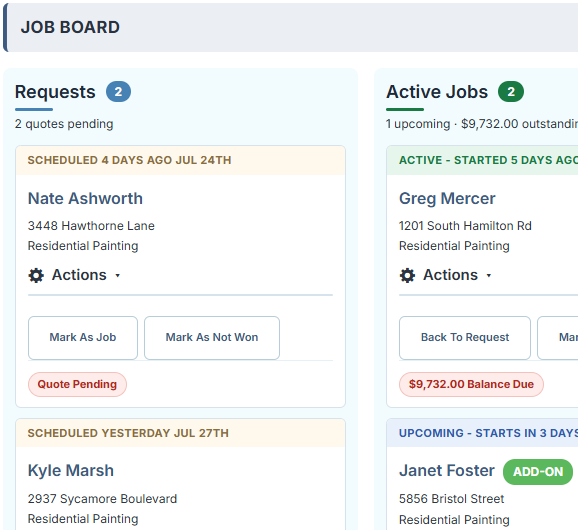
Job Board (Desktop View)
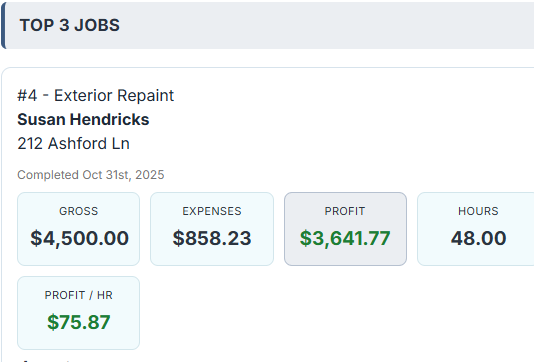
Job Financials (Mobile View)
Start free. Upgrade when your business needs more.
Both plans cover the daily quoting, scheduling, and job-management workflow.
PaintOps Pro
$45 / month flat rate per site
For professional painters and painting contractors and teams that need unlimited volume, job-costing detail, online payments, and AI tools.
- Everything in Free Plus
- Profit & Margin Reporting By Classification & Job
- Profit Page: Revenue, Profits & Top Jobs
- Online Card Payments With Stripe
- Built-in AI Tools (Estimating, Writing & Feedback)
- Vehicle Expense or Mileage Tracking
- Business Data & Reports (Year-End Accountant Summary Included)
- Priority Support
PaintOps Free Plan
$0 / no credit card required
For professional painters and painting contractors who want a complete workflow without another monthly bill.
- Unlimited Jobs & Quotes Per Month
- Unlimited Painters and Admin Users
- Hourly and Owner Painter Tracking
- Customer Management
- Receipt Handling
- Job Pipeline
- Job Notes With Camera Support
- Before & After Photos
- Resources
- Subscribe to Calendar
- Painter User Permissions
- Offline Job View When in the Field (Imports Jobs For That Day)
PaintOps is Built Differently
Most business software tries to serve every trade. PaintOps is built exclusively for painting businesses, from solo painters to growing contractors. It captures your information once, then intelligently connects it across your entire workflow. With AI-powered suggestions, painting-specific automation, and a single source of truth for every job, PaintOps helps you work faster, quote smarter, and spend less time on paperwork.
01
Made for Painting Work
Build quotes with painting-specific scopes, inclusions, exclusions, and production details instead of generic CRM fields.
- Interior and exterior scopes
- Reusable attachments, terms and disclaimers
- A workflow that matches the job
- AI feedback and rewrites
02
Your Site. Your Data.
PaintOps runs inside your WordPress website, so customer records and job history stay in a system you control.
- Stored in your WordPress database
- No forced migration
- Optional services only when enabled
- Backups that you control
03
Pricing that Grows Sensibly
Start with the core system for free, then pay one flat price per site when advanced tools add value.
- No per-seat pricing
- Free plan for smaller workloads and needs
- Upgrade only when needed
Quote
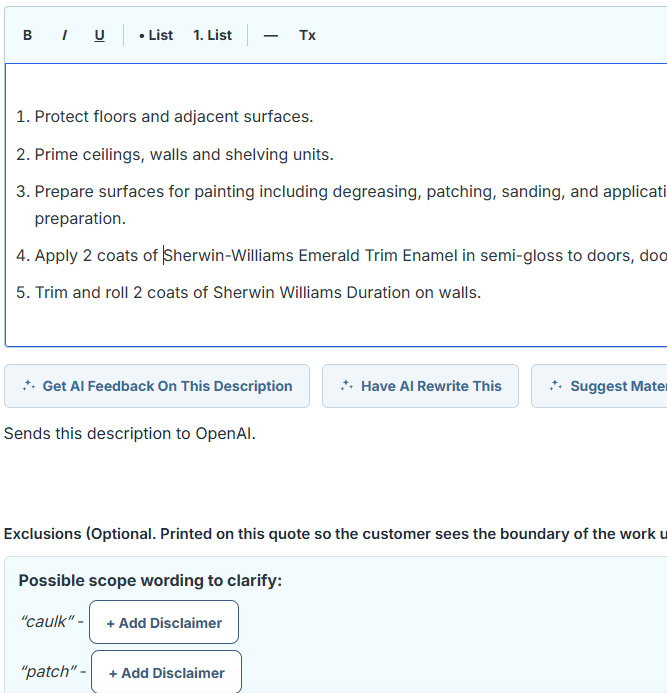
Send a quote that looks professional – and also helps protect you with exclusions
Build interior or exterior scopes, use built-in customizable standard inclusions and exclusions, choose itemized or lump-sum pricing, and email or text a clean PDF in a few clicks.
- Painting-specific scope language
- Reusable terms and disclaimers
- Printable and email-ready PDFs
- AI assistance at the push of a button (PRO)
Build Better Quotes Faster
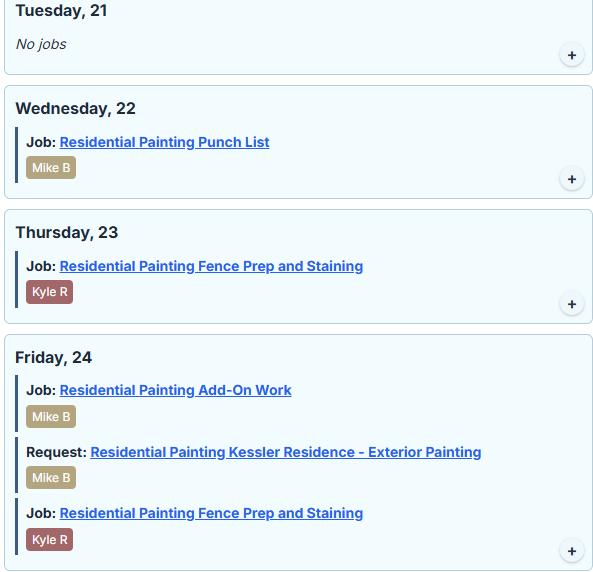
Job Calendar (Mobile View)
Schedule and track
See the week before it gets away from you
View quotes and jobs on a calendar, assign crews, track progress, store before-and-after photos, and keep hours tied to the right job.
- Google, Apple, and Outlook calendar subscriptions
- Add holidays and time off
- Optional crew check-in and check-out
- Job stages, customer records, and photos
Profit and automation · Pro
Know which jobs are actually making money
Log labor, materials, and other costs to see gross profit and margin by job. Use optional AI tools to scan receipts, estimate from photos, and improve quote wording to make it fast.
- Job-level profit and margin
- Job category financial breakdowns
- Expenses and receipt logging
- Vehicle expense and miles tracking
- Hourly and Non-Hourly Work Formulas
Free vs. Pro comparison
Use this table to review the detailed differences between both plans.
| Feature | Free | Pro |
|---|---|---|
| Quotes, scope builder, PDF, and email | Yes | Yes |
| New jobs and quotes per month | Unlimited | Unlimited |
| Users and painters | Unlimited | Unlimited |
| Permissions per non-admin (Finances, Jobs, Receipts) | Yes | Yes |
| Scheduling and crew assignment | Yes | Yes |
| Expenses and receipt logging | Yes | Yes |
| Job pipeline, customers, and photos | Yes | Yes |
| Crew time and notifications | Yes | Yes |
| Business Data CSV Export | Yes | Yes |
| PWA App – Loads daily jobs for out of service areas | Yes | Yes |
| Profit and margin reporting | No | Yes |
| Vehicle & Mileage Log | No | Yes |
| Accountant Ready Reports | No | Yes |
| Online card deposits through Stripe | No | Yes |
| AI photo estimates and quote tools | No | Yes |
Frequently asked questions
Do I need a website already?
You need a self-hosted WordPress site. Once you have one, PaintOps can be installed like another WordPress plugin. If you already have a website, you can install WordPress in a new folder and add the PaintOps plugin.
Is my customer data sent anywhere?
No, it stays in your own database. Optional features (AI, payments, maps) only contact those services when you enable them and only with the data that feature needs. See our Privacy Policy.
Who pays for AI and payment processing?
You do, through your own OpenAI and Stripe accounts. You stay in complete control of usage and costs. OpenAI usage is typically just a fraction of a cent to a few cents per action, and PaintOps lets you set monthly usage caps to keep your AI costs predictable.
Can I try Pro risk-free?
Yes. Every Pro subscription comes with a 14-day satisfaction guarantee. If PaintOps Pro isn’t working for your business, contact us within 14 days of purchase and we’ll refund you.
Start Quoting in the Next Ten Minutes.
Start free today, or unlock unlimited jobs, profit reporting, online deposits, and AI tools with PaintOps Pro.
Prefer to talk first? Contact us.